Medusa Extend · Case study
Designing B2B in Medusa
Selling to businesses can start with billing details. When a company becomes a buyer account, how do you organise its relationships and purchases in Medusa?
Adding business details to a customer may be enough for some merchants. The simplest case comes at checkout: the person enters their company name, address and VAT number to receive an invoice made out to the company.
The merchant can also offer to save these details on the customer record for reuse with every order. This works, for example, for a tradesperson who always buys for their business: their company details remain saved on their customer record.
The need changes when the merchant wants to manage the company as a customer in its own right. The company's contacts change, but its purchases must remain associated with it, and its commercial terms are not necessarily those of the people placing orders. The business relationship therefore needs to continue even when contacts change.
Several use cases can arise:
- Selling to individuals and businesses in the same store. A person may make a personal purchase, then one for their company. The two purchases must stay separate, each with its own addresses and commercial terms.
- Allowing several people to buy for the same company. Each signs in with their own credentials; purchases made for the company must remain accessible even if one of those people leaves.
- Allowing one person to buy for several companies. For each purchase, they choose the relevant company; each company may have its own addresses and commercial terms.
These use cases require a distinction between the person acting and the account they are buying for. How can we represent this relationship in Medusa, then associate orders, addresses and commercial terms with the right account? Let's build an answer from a concrete example: a fabric supplier.
One supplier, several ways to buy
Alice buys fabric from Maison Trame, a supplier that sells online with Medusa. She sometimes orders for her personal projects. She also buys for Atelier Rivage, an upholstery workshop, and for Studio Boréal, an interior architecture firm. At Maison Trame, she therefore buys for three different accounts with a single login.
Atelier Rivage has another buyer: Karim. Alice prepares a cart for the workshop, then Karim picks it up and places the order. The goods are shipped to the workshop, and Maison Trame invoices the company at the rate agreed with the workshop. A few months later, Alice leaves Atelier Rivage. Karim must be able to continue buying without losing previous orders or the workshop's addresses. Alice continues buying for Studio Boréal and for herself.
Maison Trame wants to support the three use cases described above within a single Medusa installation. In this example, a company's buyers share its carts, orders and address book. Each company may have its own commercial terms.
This sharing is Maison Trame's choice. Another supplier might keep individual carts while sharing company orders. In both cases, the store needs to know who is preparing the cart, for which company, and who can pick it up.
For a personal purchase, Alice is both the person placing the order and the customer the purchase belongs to. For the workshop, she acts on behalf of another account: the company account of Atelier Rivage. Her membership of the workshop must neither give Karim access to Alice's personal orders nor apply the workshop's rate to a cart intended for Studio Boréal.
 Aliceone login
-
Alice
Alice's cart
Alice's addresses
-
 Atelier Rivage
Workshop carts
Workshop addresses
-
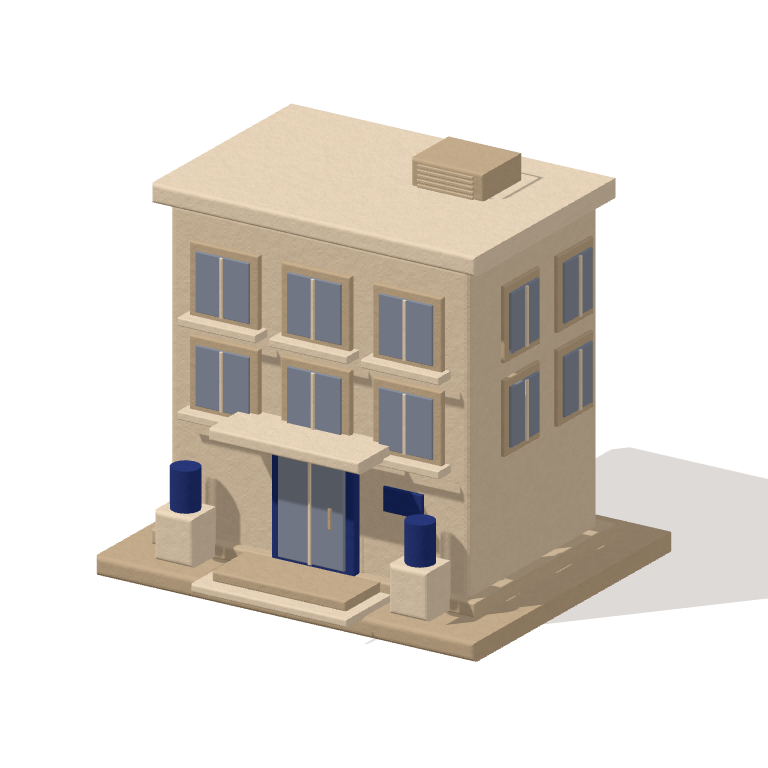 Studio Boréal
Studio carts
Studio addresses
What Medusa already handles
Atelier Rivage's purchases largely follow the same process as Alice's personal purchases: choose products, fill a cart, obtain a price, place an order, pay and receive a delivery. Medusa already has the modules needed for these operations.
The Customer module manages customer records. In our design, Alice's record represents the person known to the store, and Alice signs in through Medusa's native authentication. She keeps this same record when buying for a company: she does not have to create a new identity for each use case.
Products are still managed by Product, carts by Cart and orders by Order. Price calculations remain the responsibility of Pricing. Payments are still managed by Payment, stock reservations by Inventory and deliveries by Fulfillment. An Atelier Rivage order therefore remains a Medusa order, which the merchant handles with their usual tools.
The Medusa B2B recipe explains how to use customer groups, price lists and sales channels to offer business pricing and products. It also describes creating a custom module with companies and employees. The official B2B starter already provides company and employee management.
In our case, we need to specify which account each purchase is made for. Knowing that Alice belongs to a business customer group does not tell us whether her cart is personal, for Atelier Rivage or for Studio Boréal. We will therefore represent Alice's memberships of these companies, then record the company concerned by each cart and order. This will allow Maison Trame to retain a company's purchases when its buyers change, while keeping Alice's other purchases separate.
The Company module's entities
We bring information specific to business customers together in a Company module. We will use four of its entities: Company, Buyer, CompanyAddress and CompanyGroup.
A Company entity represents a business customer. Atelier Rivage and Studio Boréal each have a record containing the company name.
The record also has a status. A company can be active or suspended. Maison Trame can suspend Atelier Rivage's purchases without deleting its record or existing orders.
The link between a person and a company also becomes information in its own right. We represent it with a Buyer entity: it links a Customer to a Company and indicates whether this membership is active. Alice has one membership of Atelier Rivage and another of Studio Boréal. Karim has his own membership of Atelier Rivage.
Buyer therefore does not replace Alice's record. It represents her role as a buyer for a specific company. Deactivating her membership of Atelier Rivage removes her access to the workshop's data and purchases; her customer record and her membership of Studio Boréal remain in place. If she returns to work for the workshop, that same membership can be reactivated.
A module link connects each Buyer to the relevant person's Customer record. Alice's membership of Atelier Rivage and her membership of Studio Boréal therefore point to the same customer record. Alice is registered once in the Customer module; her two memberships are recorded in the Company module.
Atelier Rivage's billing and shipping addresses are stored in CompanyAddressentities, associated with its Companyrecord. They form the company's address book. In our example, both Alice and Karim can choose an address from it when preparing a cart for the workshop.
Alice's personal addresses remain stored with her record in the Customermodule. For a personal purchase, the store offers her these addresses; for a purchase intended for Atelier Rivage, it offers the workshop's addresses. Studio Boréal's addresses are kept in that other company's address book.
To apply the same commercial terms to several companies, we add a CompanyGroupentity. For example, Maison Trame creates a “Partner workshops” group that Atelier Rivage belongs to. A price list can target this group rather than each workshop individually.
The Company module records the companies belonging to each group. A company can belong to several groups, and a rate can also be reserved for it directly. These company groups are distinct from the customer groups in the Customermodule, which bring people together.
One important decision remains: what does a buyer's Buyer membership of their company allow? At Maison Trame, buyers with active memberships can view their company's orders and pick up its carts. This is the access policy chosen for this store. Another store might restrict a cart to its creator or distribute access by department. Alice's membership of the workshop provides the basis for these rules; their content depends on each project.
Alice leaves Atelier Rivage
| Buyer | Before | After |
|---|---|---|
| Alice | Active Buyer | Access removed |
 Karim | Active Buyer | Active Buyer |
Atelier Rivage Its orders
remain in place.
Applying the company's prices
Maison Trame offers the same fabrics to several customer groups. A roll can be bought at the public price by Alice, at the partner workshop rate by Atelier Rivage or at the rate negotiated with Studio Boréal.
Medusa already calculates prices with the Pricingmodule. Each variant has base prices by currency. Price lists add amounts reserved for buyers who meet the list's conditions, with optional quantity tiers. We use these conditions to target a company or a CompanyGroup.
In our fictional example, Maison Trame sets the public price of a roll at €100. A list reserved for the “Partner workshops” group offers €80, then €70 for ten rolls or more. Another list reserves a €65 price for Studio Boréal.
To choose the right price, the pricing engine needs to know which company the purchase is for and which groups it belongs to. With this information, twelve rolls ordered for Atelier Rivage are priced at €70 each, since the ten-roll tier has been reached; for Studio Boréal, they are priced at €65. In her personal cart, Alice keeps her personal terms: here, the public price of €100.
Maison Trame sells to individuals and businesses: its public prices provide the base, and its lists add business terms. A supplier selling only to businesses can set its B2B base prices directly, without reference to a consumer price.
The same fabric, three prices
AlicePersonal purchasePublic price
€100per rollAtelier RivagePurchase for the workshopCompanyGroupPartner workshops
Studio BoréalPurchase for the studioStudio-only rate
€65per rollOffering different catalogues
Maison Trame decides to reserve certain large-format rolls for businesses. Other fabrics remain available to everyone. Medusa's sales channels allow these two offerings to be organised.
Maison Trame creates one channel for its consumer store and one for its business area. Rolls reserved for businesses are associated only with the second. Fabrics sold to both customer groups are associated with both channels: they remain the same products, with the same variants and stock.
The channel determines the catalogue offered. Price lists determine the applicable rates. Atelier Rivage and Studio Boréal can therefore share the same business catalogue while benefiting from different prices.
A shared catalogue, a business-only offering
| Products | Channel consumer | business |
|---|---|---|
 Shared fabric | Available | Available |
 Large-format roll | Not listed | Available |
Bringing it together with the B2B API
In the store, Alice indicates who she is buying for: herself, Atelier Rivage or Studio Boréal. This choice defines her purchasing context : the person acting and the account they act for. It allows the right catalogue, prices and addresses to be displayed.
This context accompanies each purchasing journey. Alice can prepare a cart for the workshop, then another for the studio: choosing Studio Boréal for the second does not change the first.
Dedicated company routes
To display products, view orders or create a cart, the store sends requests to Medusa's API. Each API route provides access to an action or information.
For personal purchases, the store uses Medusa's usual Store routes. To act on behalf of a company, we add dedicated Store B2B routes grouped under /store/b2b/companies/:company_id. The identifier in the route indicates the company concerned.
The module exposes two routes in particular:
GET /store/b2b/companies/:company_id/productsto view products and their prices;POST /store/b2b/companies/:company_id/cartsto create a cart for that company.
These routes let us view a company's catalogue and prices, create its carts and retrieve its orders. When Alice chooses Atelier Rivage, the store calls the B2B routes with the workshop's identifier. Alice remains the signed-in person.
Checking that Alice can act for Atelier Rivage
In this design, we place checks at the entry point of company routes, in middleware : functions executed before the requested action. Medusa's native authentication first identifies Alice from her login.
The B2B check then verifies two things:
- Atelier Rivage is an active company;
- an active
Buyermembership authorises Alice to act for Atelier Rivage.
These checks apply to all company routes, whether displaying products and their prices, creating a cart or placing an order.
To view an order in Atelier Rivage's area, Alice must be authorised to act for the workshop. The requested order must also belong to Atelier Rivage. The server checks both conditions before displaying it.
If Maison Trame removes Alice from Atelier Rivage's authorised buyers, Alice loses access to the workshop's carts and orders. These purchases remain available to Karim. Alice keeps her personal purchases and her access to Studio Boréal.
Displaying products and their prices
Alice first browses Atelier Rivage's catalogue. Once the checks pass, the B2B route reads products using Medusa's native mechanism, restricted to the business channel. It enriches the price calculation context with the workshop's identifier and the company groups it belongs to.
The store can then display this catalogue's products at partner workshop rates. If Alice chooses Studio Boréal, the store requests products in the studio's context, and the displayed prices follow its commercial terms.
Creating a cart with native hooks
To create Atelier Rivage's cart, the B2B route calls the native createCartWorkflowworkflow. This workflow provides hooks : extension points for adding our own logic. We use two for company purchases:
- In
setPricingContext, we provide Atelier Rivage's identifier and its company groups. The pricing engine can then apply the price lists described above. - In
cartCreated, once the cart is created, we record that it belongs to Atelier Rivage and that Alice is its creator.
When Alice then adds a product, the native addToCartWorkflow workflow also provides setPricingContext. We supply the same information to calculate the added product's price.
Two hooks to adapt the native cart
Alicebuys forAtelier Rivage
createCartWorkflowsetPricingContextAtelier Rivage + its groupsCalculate the applicable pricecartCreatedCompany: Atelier RivageCreator: AliceAssociate the cart
 Workshop cartWorkshop rate
Created by Alice
Confirming the order
Karim then picks up the workshop's cart. The store calls the corresponding B2B route; this time the checks verify that Karim can act for Atelier Rivage.
We reuse completeCartWorkflow to place the order. In its validatehook, we check that the company is still active and that the details required for the order have been provided.
The result is an ordinary Medusa order. We record that it was placed for Atelier Rivage and confirmed by Karim; Alice remains identified as the cart's creator.
Alice
Karim
Atelier Rivage
company account
Cart, then order
actions
- Alice prepares the cart
- Karim confirms the order
The order keeps the details used for this purchase. If the workshop later moves, its address book can be updated without changing the addresses on existing orders.
Adding workflows specific to the company account
Operations that concern only the Company module can have their own workflows. A registration workflow can, for example, create a company, record its billing address if supplied, then associate an initial buyer with it.
In this example, the first buyer already has a Customer record: the workflow does not create a new person, it creates the Buyer membership linking that record to the new company. Adding another buyer or removing a buyer's access also uses Company module operations, called from routes reserved for company management.
B2B takes shape in Medusa
Here is how to manage companies, their buyers, prices and orders in Medusa.
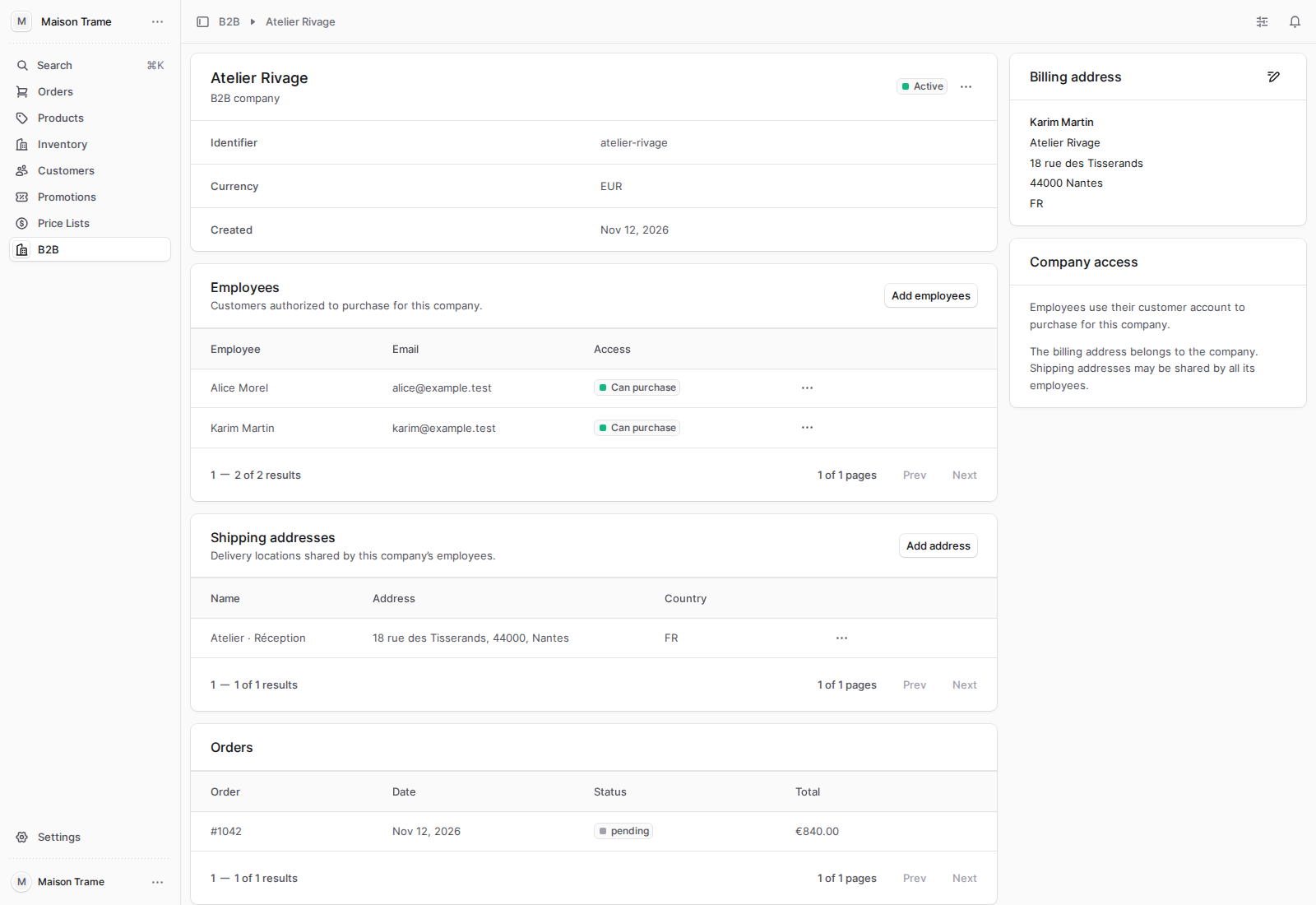
The company and its buyers
Atelier Rivage's record shows its two buyers, Alice and Karim, along with the workshop's address book.
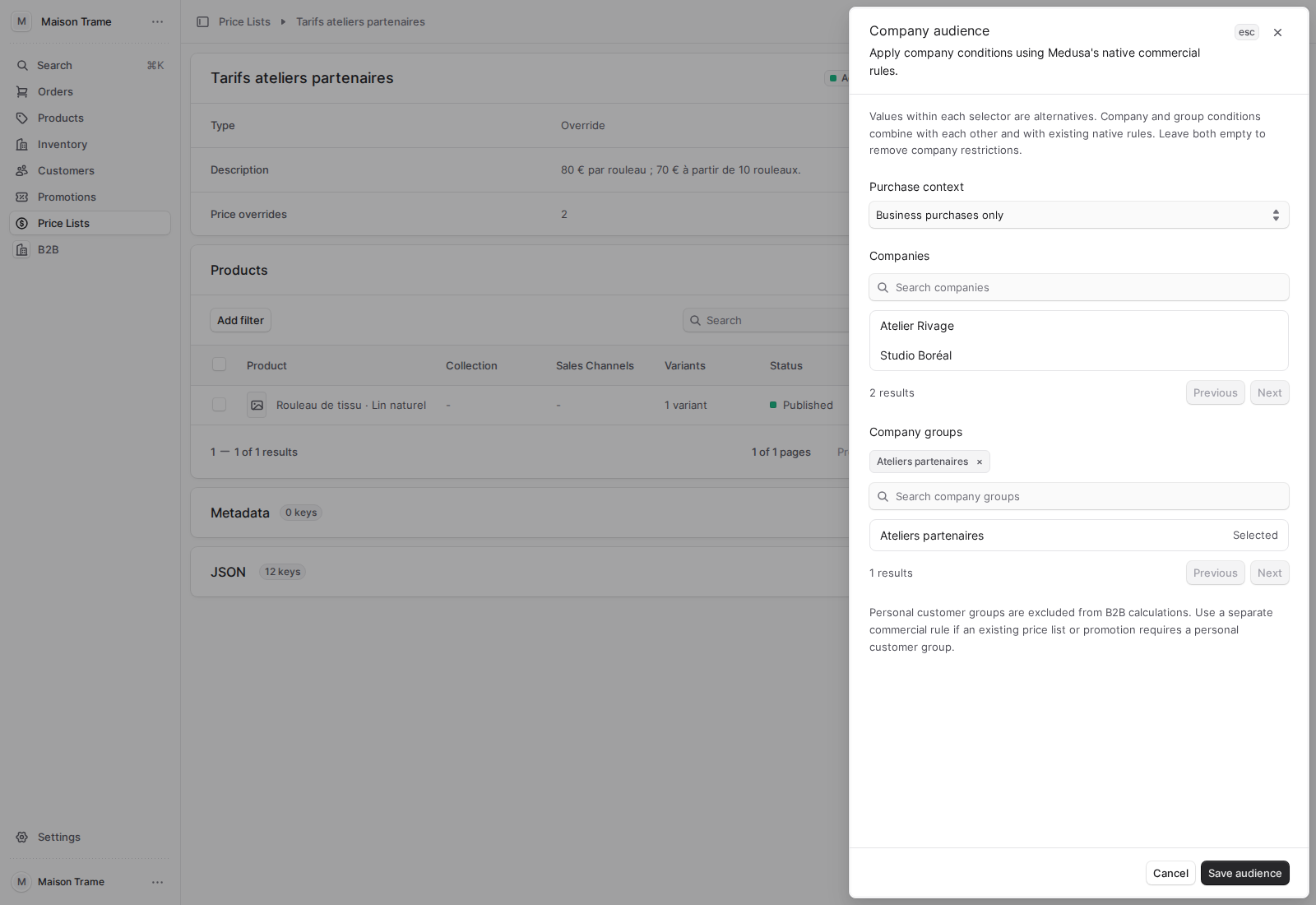
A rate reserved for partner workshops
The price list contains our two amounts: €80 per roll, then €70 from ten rolls. It targets the “Partner workshops” company group.
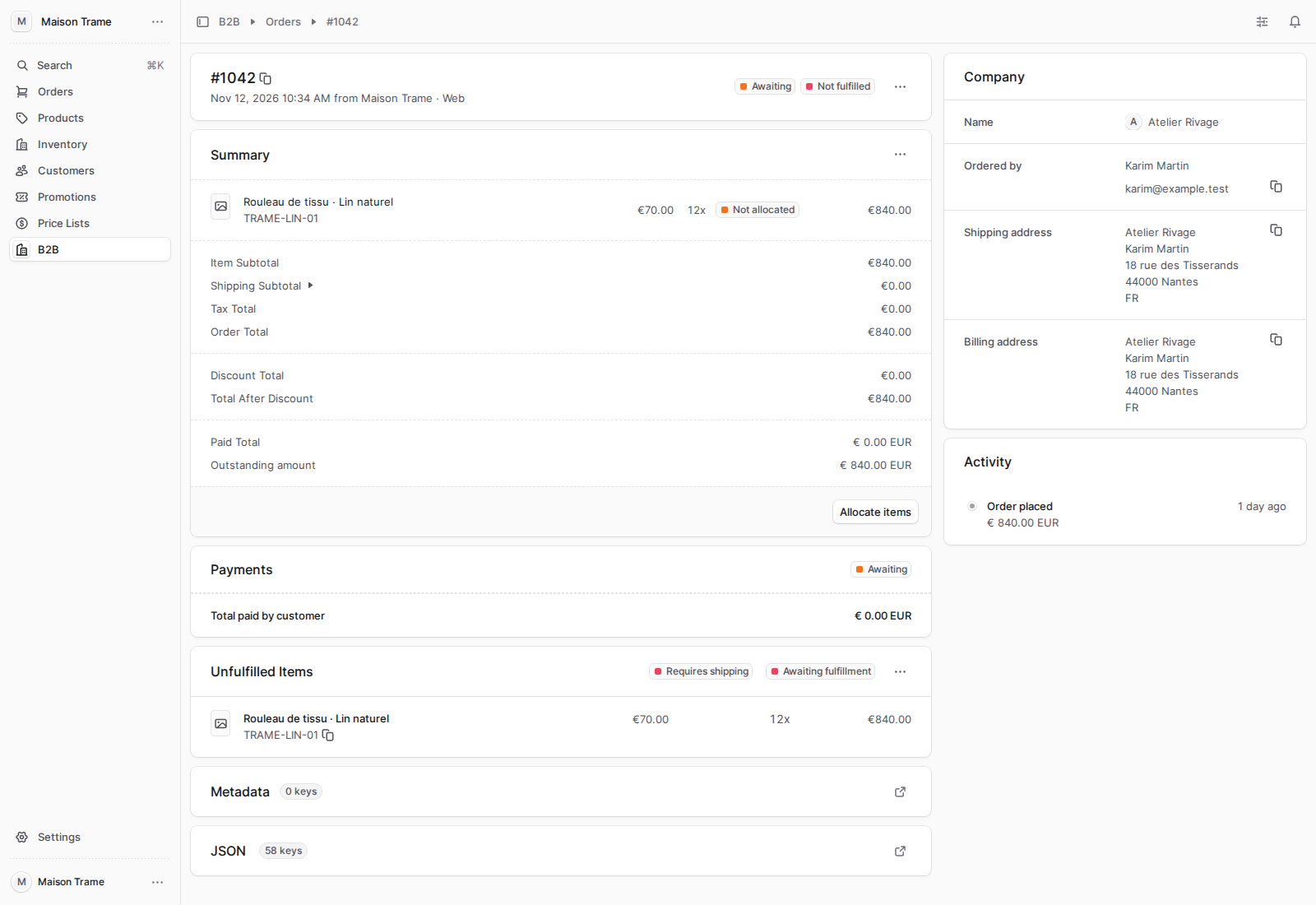
An order placed for Atelier Rivage
The B2B order shows twelve rolls at €70, or €840 in products. Its Company panel brings together Atelier Rivage, Karim — who placed the order — and the shipping and billing addresses.
A foundation for different B2B structures
Alice can now buy from Maison Trame for herself, for Atelier Rivage or for Studio Boréal. Each cart keeps the relevant account, its addresses and its commercial terms. Karim can pick up the workshop's cart and confirm the order; after Alice leaves, deactivating her membership removes her workshop access without interrupting the company's purchases.
To build this behaviour, we added companies, their memberships linking them to people, their addresses and their company groups. Carts, orders and price calculations remain Medusa's. Access checks verify who can act; hooks bring company context to native operations.
This foundation can support a mixed store, a business-only operation or a reseller portal with a reserved catalogue. Buyers can act for one company or several, according to the memberships granted to them.
It also allows more detailed structures to be designed by adding the necessary relationships and rules. A parent company and its subsidiaries could have separate accounts, with purchases or negotiated terms to coordinate. Departments could have their own access and budgets. These additional relationships would need to be modelled: a person's membership of a company alone does not define them.
Roles within the same company can also be distinguished. Alice could prepare purchase proposals and identify fabrics, while only Karim would be authorised to commit spending. An accountant could view billing documents without buying. Spending limits, approval processes or quote requests would add their own data and steps to these journeys.
These extensions would build on the model presented here without changing its principles: the buyer account is still chosen explicitly, people keep their identity, and commercial operations rely on Medusa's mechanisms. These distinctions provide the starting point for adapting B2B to how each merchant actually operates.